In the rapidly evolving world of home automation, the term ‘smart home scenes’ has become synonymous with ultimate convenience and personalized living. But what exactly are smart home scenes, and more importantly, how can you, a savvy homeowner, create them to transform your daily routines? This comprehensive DIY tutorial will guide you through the process of establishing five essential, personalized routines, empowering you to unlock the full potential of your smart home.
We’re not just talking about turning lights on and off with your voice; we’re delving into the art of orchestrating multiple devices to work in harmony, creating an environment that responds intuitively to your lifestyle. By the end of this article, you’ll be a master of setting up sophisticated smart home scenes that enhance comfort, bolster security, and even trim down your energy bills.
Understanding Smart Home Scenes: The Heart of Automation
Before we dive into the practicalities, let’s clarify what smart home scenes are. Think of a scene as a predefined state for multiple smart devices that can be activated with a single command, schedule, or trigger. Instead of individually adjusting your lights, thermostat, and blinds, a single “Good Morning” scene can set them all simultaneously to your preferred settings. This is the core concept behind maximizing your smart home’s efficiency and convenience.
The beauty of smart home scenes lies in their ability to reflect your unique habits and preferences. They move beyond simple automation – like a motion sensor turning on a light – to create cohesive, multi-device experiences. Whether you’re using Amazon Alexa, Google Assistant, Apple HomeKit, Samsung SmartThings, or another smart home ecosystem, the principles of creating and managing smart home scenes remain largely consistent.
Why Are Smart Home Scenes Essential?
- Unparalleled Convenience: Imagine waking up to your ideal environment without lifting a finger.
- Enhanced Security: Simulate occupancy when you’re away, or trigger alarms and lights in an emergency.
- Energy Efficiency: Optimize heating, cooling, and lighting schedules to reduce waste.
- Personalized Ambiance: Instantly set the mood for any activity, from movie nights to dinner parties.
- Streamlined Daily Routines: Automate repetitive tasks, freeing up your time and mental energy.
Our journey begins with ensuring your smart home foundation is solid. This means having a reliable Wi-Fi network, compatible smart devices (lights, thermostats, locks, speakers, etc.), and a central hub or app to control them all. Once these prerequisites are in place, you’re ready to embark on creating truly intelligent smart home scenes.
Scene 1: The “Good Morning” Scene – Waking Up Right
Starting your day on the right foot can make all the difference. A “Good Morning” smart home scene is designed to gently ease you into your day, preparing your home as you prepare yourself. This scene typically involves gradual lighting, temperature adjustments, and perhaps some soft music or news updates.
Devices You Might Need:
- Smart Lights (preferably dimmable and color-changing)
- Smart Thermostat
- Smart Blinds/Shades (optional but highly recommended)
- Smart Speaker/Display
Step-by-Step Creation:
- Choose Your Trigger: Most people prefer a time-based trigger for their morning scene. Set it for 15-30 minutes before your alarm to allow for a gentle transition. Some advanced systems allow for light-based triggers (e.g., sunrise).
- Gradual Lighting: Set your bedroom lights to slowly brighten over a 10-minute period, starting at a very low intensity and a warm color temperature, gradually increasing to a comfortable brightness and a more neutral white.
- Climate Control: Adjust your smart thermostat to your preferred morning temperature. If your bedroom is separate, ensure only that zone is affected initially.
- Open the Blinds: If you have smart blinds, schedule them to slowly open as the lights reach their peak brightness, letting in natural light.
- Morning Briefing/Music: Have your smart speaker play a gentle alarm, followed by a brief news summary, weather report, or your favorite morning playlist.
- Bathroom Prep (Optional): If you have smart lighting in your bathroom, you can include a setting for a slightly brighter, cooler light to help you get ready.
Pro Tip: Experiment with different light intensities and color temperatures. Warm, low light is great for easing into wakefulness, while brighter, cooler light can boost alertness as you get ready.
Scene 2: The “Leaving Home” Scene – Security and Savings
When you leave your home, you want peace of mind knowing everything is secure and no energy is being wasted. The “Leaving Home” smart home scene is crucial for both security and efficiency.
Devices You Might Need:
- Smart Locks
- Smart Security System (cameras, motion sensors, door/window sensors)
- Smart Thermostat
- Smart Lights
- Smart Plugs (for non-smart devices)
Step-by-Step Creation:
- Choose Your Trigger: This can be activated by pressing a button on a smart switch near the door, a voice command as you walk out, or even geo-fencing (your phone leaving a designated area).
- Lock All Doors: Ensure all smart locks engage.
- Arm Security System: Activate your smart home security system, including cameras, motion sensors, and door/window sensors.
- Adjust Thermostat: Set your smart thermostat to an energy-saving “away” temperature.
- Turn Off Lights: Switch off all interior lights. You might choose to leave one or two smart lights on a random schedule to simulate occupancy, which we’ll cover in the “Away Mode” scene.
- Power Down Unnecessary Devices: Use smart plugs to cut power to devices that don’t need to be on while you’re away (e.g., entertainment systems, chargers).
Pro Tip: If using geo-fencing, ensure it’s reliable and that all household members have it enabled if they are the last to leave. Consider a small delay to allow everyone to exit before locking doors.
Scene 3: The “Welcome Home” Scene – A Warm Reception
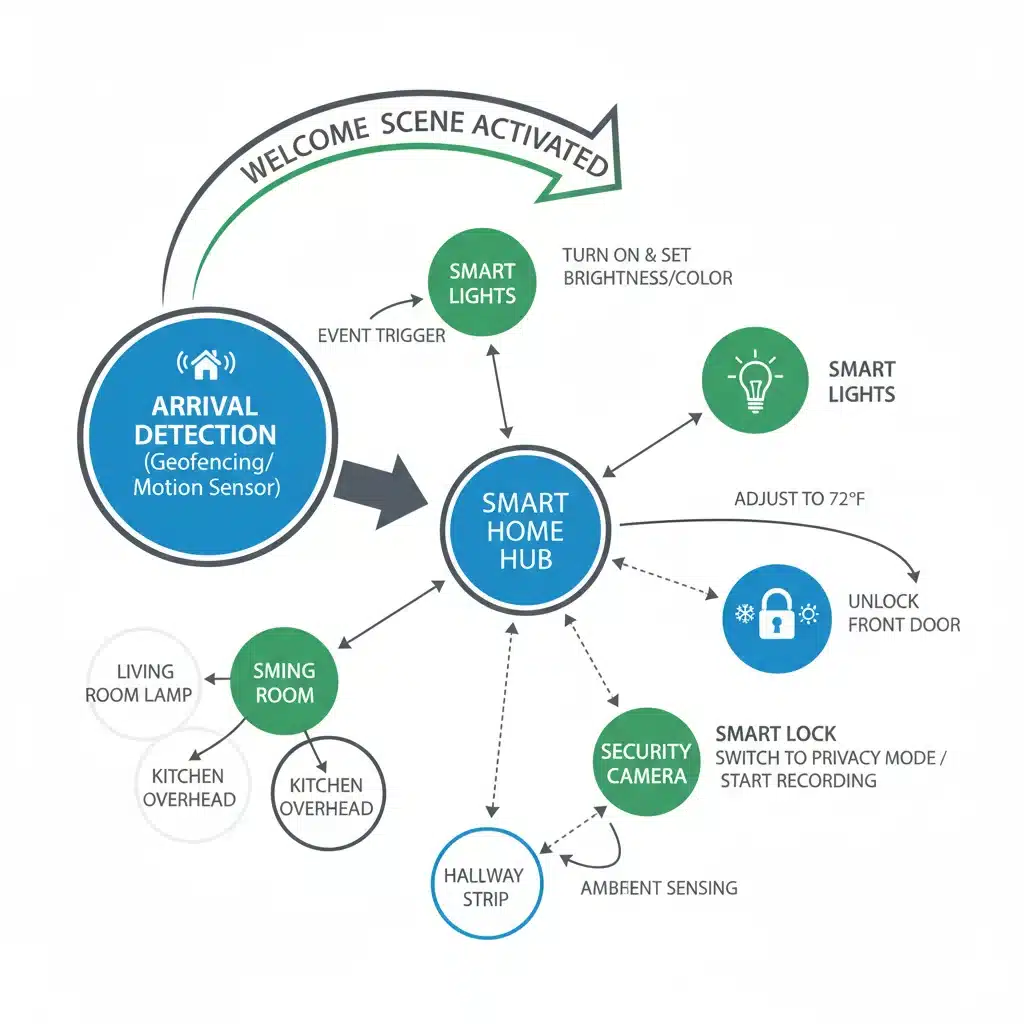
There’s nothing quite like returning to a welcoming home. The “Welcome Home” smart home scene reverses the “Leaving Home” scene, preparing your environment for your arrival.
Devices You Might Need:
- Smart Lights
- Smart Thermostat
- Smart Locks
- Smart Speaker
Step-by-Step Creation:
- Choose Your Trigger: Geo-fencing (your phone entering a designated area) is ideal here, triggering the scene as you approach home. Alternatively, a voice command upon entry or a scheduled time.
- Disarm Security System: Deactivate your smart security system.
- Unlock Door: Unlock the front smart lock.
- Adjust Thermostat: Return your smart thermostat to your comfortable “home” temperature.
- Turn On Lights: Activate entry lights, living room lights, and perhaps kitchen lights to a welcoming brightness and color temperature.
- Play Ambient Music: Have your smart speaker play some relaxing background music.
Pro Tip: Integrate your garage door opener if it’s smart. The scene can open the garage door as you pull into the driveway, making your arrival even smoother.
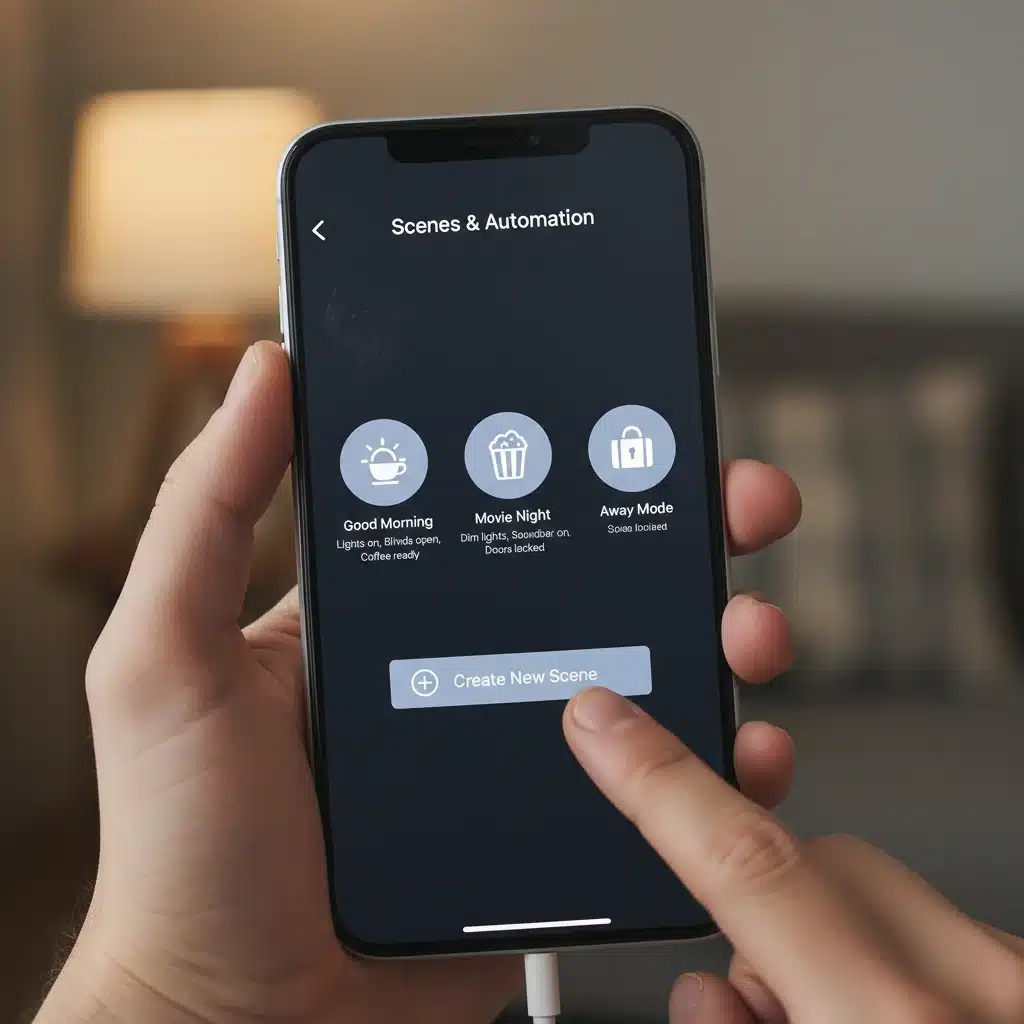
Scene 4: The “Movie Night” Scene – Cinematic Comfort
Transform your living room into a private cinema with a dedicated “Movie Night” smart home scene. This is where the ambiance truly shines, showcasing the power of integrated devices.
Devices You Might Need:
- Smart Lights (dimmable, color-changing, and perhaps smart light strips behind the TV)
- Smart Blinds/Shades
- Smart TV or Projector
- Smart Speaker/Soundbar
- Smart Plugs (for non-smart media devices)
Step-by-Step Creation:
- Choose Your Trigger: A voice command (e.g., “Alexa, Movie Night”), a button press on a smart remote or wall switch, or even a scheduled time if you have a regular movie night.
- Dim the Lights: Lower all main living room lights to a very dim setting, perhaps a warm amber or a subtle blue/purple if you have color-changing bulbs.
- Accent Lighting: Activate smart light strips behind your TV or projector screen for bias lighting, reducing eye strain and enhancing perceived contrast.
- Close the Blinds: Lower your smart blinds or shades to block out external light.
- Power On Entertainment: Turn on your smart TV or projector, and ensure your smart soundbar or speaker system is activated.
- Adjust Climate (Optional): Slightly lower the thermostat for a cozy movie-watching temperature.
Pro Tip: If your smart TV or media device supports it, some ecosystems can even trigger the scene when you start playing content on specific apps (e.g., Netflix). This is a more advanced integration but offers seamless automation.
Scene 5: The “Good Night” Scene – Restful Retreat
A well-executed “Good Night” smart home scene ensures your home is secure and optimized for sleep, providing peace of mind as you drift off.
Devices You Might Need:
- Smart Lights (especially in bedrooms and hallways)
- Smart Locks
- Smart Security System
- Smart Thermostat
- Smart Speaker (for white noise or sleep sounds)
Step-by-Step Creation:
- Choose Your Trigger: A voice command (e.g., “Hey Google, Good Night”), a bedside smart button, or a scheduled time.
- Secure the Home: Engage all smart locks. Arm your security system in “stay” mode (which typically bypasses interior motion sensors but activates door/window sensors).
- Turn Off All Lights: Switch off all lights in the house, except perhaps a very dim nightlight in a hallway or bathroom, set to turn off after a short delay or by motion sensor.
- Adjust Thermostat: Set your smart thermostat to your preferred sleeping temperature.
- Activate Sleep Aids: If you use a smart speaker for white noise, sleep sounds, or a guided meditation, have it start playing.
- Power Down Unnecessary Devices: Use smart plugs to ensure all entertainment systems and non-essential devices are powered off.
Pro Tip: Consider a “panic button” scene that can be triggered from your bedside for emergencies, immediately turning on all lights, sounding alarms, and even notifying emergency contacts.
Advanced Tips for Optimizing Your Smart Home Scenes
Once you’ve mastered the basic smart home scenes, you can begin to explore more advanced functionalities to truly personalize your smart home experience. These tips will help you refine your existing scenes and inspire new ones.
Conditional Logic and “If-Then” Statements
Many smart home platforms allow for conditional logic, meaning a scene only triggers if certain conditions are met. For example:
- “If it’s after sunset AND motion is detected in the living room, THEN turn on living room lights.”
- “If the front door opens AND it’s between 8 AM and 5 PM on a weekday, THEN play ‘Welcome Home’ music.”
This adds another layer of intelligence, preventing scenes from triggering unnecessarily and making your automations more intuitive. Check your specific smart home app (e.g., SmartThings, HomeKit, IFTTT) for options like “Routines,” “Automations,” or “Recipes” that support conditional logic.
Integrating Third-Party Services with IFTTT
IFTTT (If This Then That) is a powerful web-based service that allows you to create applets (simple conditional statements) connecting various smart devices and web services that might not natively communicate. This can significantly expand the capabilities of your smart home scenes.
For instance, you could create an IFTTT applet that: “If my favorite sports team scores, THEN flash the living room lights green.” Or, “If the weather forecast predicts rain tomorrow, THEN send me a notification and turn my bedroom light blue tonight.” The possibilities are vast and limited only by your imagination and the available services.
Utilizing Presence Detection
Beyond simple geo-fencing, some smart home systems offer more granular presence detection. This can involve:
- Multiple User Geo-fencing: Ensuring the “Leaving Home” scene only triggers when the LAST person leaves, and “Welcome Home” triggers when the FIRST person arrives.
- Motion Sensors: Using motion sensors to detect occupancy in rooms, allowing lights to stay on only when a room is occupied.
- Smart Mats/Pressure Sensors: Placing these under beds or chairs to trigger scenes based on occupancy.
Fine-tuning presence detection makes your smart home scenes even more seamless and responsive to who is actually home.
Voice Assistant Integration
While we’ve mentioned voice commands as triggers, fully integrating your smart home scenes with your voice assistant (Alexa, Google Assistant, Siri) is key to hands-free convenience. Practice natural language commands and explore custom phrases if your system allows. For example, instead of “Turn on the living room lights and dim them to 30%,” a single command like “Alexa, set the mood” can activate your “Relaxation” scene.
Scheduled vs. Event-Based Triggers
Most smart home scenes can be triggered in two main ways:
- Scheduled: Based on time (e.g., 7:00 AM, sunset, 10:00 PM).
- Event-Based: Triggered by an action or condition (e.g., motion detected, door opened, voice command, temperature reached).
A truly intelligent smart home combines both. Your “Good Morning” scene might be scheduled, but your “Movie Night” scene is likely event-based (triggered by you). Think about which trigger makes the most sense for each routine you want to automate.
Review and Refine
Smart home automation is an ongoing process. Don’t set up your smart home scenes once and forget them. Regularly review how they’re performing. Are there any false triggers? Are the settings still optimal for your needs? As you add new devices or your routines change, update your scenes accordingly. This iterative process ensures your smart home remains perfectly tailored to your lifestyle.
Troubleshooting Common Smart Home Scene Issues
Even with the best planning, you might encounter hiccups when setting up your smart home scenes. Here are some common issues and how to troubleshoot them:
- Scene Not Triggering:
- Check the Trigger: Is your schedule correct? Is the sensor (motion, door, presence) working? Is the voice command recognized accurately?
- Device Connectivity: Ensure all devices involved in the scene are connected to your Wi-Fi and online.
- App/Hub Issues: Restart your smart home app or hub. Sometimes a simple reboot can resolve connectivity problems.
- Permissions: Verify that your smart home app has necessary permissions (e.g., location services for geo-fencing).
- Only Part of the Scene Triggers:
- Device Compatibility: Double-check that all devices are compatible with your smart home ecosystem and the scene creation tool.
- Device Status: Ensure the non-triggering device is online and responsive when you try to control it manually.
- Scene Configuration: Carefully review the scene settings in your app to ensure all desired actions are correctly added and enabled.
- Lag or Delay in Scene Execution:
- Network Congestion: A crowded Wi-Fi network can cause delays. Consider upgrading your router or optimizing your network.
- Distance from Hub/Router: Devices far from your Wi-Fi router or smart home hub might experience delays. Consider a Wi-Fi extender or a mesh network.
- Cloud Dependency: Some scenes rely on cloud processing, which can introduce slight delays compared to local processing.
- Scene Triggers at the Wrong Time/Unexpectedly:
- Time Zones: Ensure your smart home hub and devices are set to the correct time zone.
- Conflicting Scenes: Check if another scene or automation is overriding the intended scene.
- Geo-fencing Accuracy: Adjust the radius of your geo-fence if it’s triggering too early or too late.
- Voice Commands Not Working:
- Exact Phrasing: Ensure you are using the exact phrase defined for your scene.
- Voice Assistant Connectivity: Check if your voice assistant (Alexa, Google Assistant) is online and responsive to other commands.
- Device Sync: Make sure your smart home scenes are synced with your voice assistant app.
Patience and systematic troubleshooting are key. Most issues can be resolved by carefully reviewing your setup and ensuring all components are communicating correctly.
The Future of Smart Home Scenes
As artificial intelligence and machine learning continue to advance, the capabilities of smart home scenes are set to become even more sophisticated. We can anticipate:
- Predictive Automation: Systems learning your habits over time and proactively adjusting your home environment without explicit scenes.
- Hyper-Personalization: Scenes that adapt not just to time or presence, but to your mood, health metrics (via wearables), or even external environmental factors like pollen count.
- Seamless Interoperability: Greater ease in connecting devices from different manufacturers, making scene creation more fluid and less dependent on specific ecosystems.
- Enhanced Security and Privacy: More robust security features and transparent control over your data in automated environments.
The journey to a truly intelligent home is ongoing, and by mastering smart home scenes today, you’re laying the groundwork for an even more integrated and intuitive living experience tomorrow.
Conclusion: Your Smart Home, Your Rules
Creating personalized smart home scenes is not just about convenience; it’s about reclaiming control over your living environment and tailoring it precisely to your needs and desires. From the gentle awakening of your “Good Morning” scene to the secure embrace of “Good Night,” each routine you establish adds a layer of intelligence and comfort to your daily life.
We’ve walked through five fundamental smart home scenes, providing you with a robust framework to start your automation journey. Remember, the key is experimentation and personalization. Don’t be afraid to adjust settings, combine elements, and even invent entirely new smart home scenes that cater to your unique lifestyle.
Embrace the power of smart home scenes to transform your house into a truly responsive and intuitive home. The future of living is here, and with this guide, you’re well-equipped to build it, one intelligent scene at a time.